
At our last CNC project activity we had an exercise of engraving text and in particular the attempt yesterday to get a cursive script to engrave. The aim was to have a font that generated varying width engraving by varying the z-axis height during the carving out of the letters. The cutting tool was a 90 degree included angle vee-bit. The first pass was using a fairly plain font on a piece of pine timber. Our spindle speeds need to be much higher for better cut quality. (That’s our next upgrade)
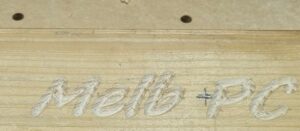
The editing of the this first sketch to use a cursive script was unsuccessful as the Fusion 360 software kept throwing “contours are missing” errors. This was the case on attempts using Verandah Reverie, Latenza Script and Cream Cake fonts. After much head scratching AI was able to help with some suggestions, none of which overcame the issue.
The problem is that Fusion struggles to figure out what is the “inside” versus the “outside” of the letter due to fine details, overlapping lines, or tiny gaps in the geometry of the font.
A further request for alternative script fonts that might work revealed these:
Great Vibes – Very clean loops, smooth curves, and rarely produces crossing geometry.
Pacifico – A thicker, casual cursive script that has generous kerning and thick stroke profiles.
Sacramento – Monoline script with consistent thickness; less prone to self-intersecting loops.
Allura – Elegant calligraphy font with very clean vector paths.
The first of these was able to successfully create a toolpath and so we did a run or two on the machine. This one used some pine timber.
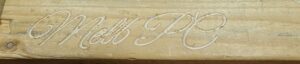
A scrap of laminated MDF board brought up the contrast better.
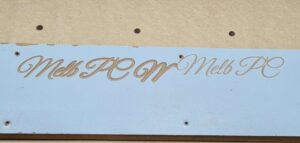
The lighter z-axis touch gives the better looking result but the effect is well demonstrated.
Got some ideas for a CNC project? – engraving or otherwise, the machine is up for your challenge. Join us next Sunday at 12PM. Details here.